



 Your Launch Point
Resources and Reference for Thought Leaders
The primary feature of the Thought Leaders program is to write op/ed articles and perspectives. Rather than a convoluted process of emailed drafts and back & forth, you can publish directly to our WordPress content management system. We’ll handle copy editing and other steps.
The Thought Leaders program also spans Engage Media’s publications, so you can publish to one or many of these outlets. You may have signed up for the program with one of these publications in mind, as it aligns
with your company’s focus. But the opportunity exists to syndicate content across these properties for maximum impact.
We will automatically publish your articles to the correct publications, based on their contents and themes. We also welcome requests for any given article to be cross-published to many outlets. In any case, the publishing backend is unified here on Engage Media, following the steps outlined below.




Instructions for getting started.
- If you’re here on this page, you’re already logged in. Good start.
- The main place where you can draft articles is here.
- Once there, click “Add Post” at the top of the page to start a new article.
- You can save your article draft as you go, or write it in stages. There’s no time limit.
- We have image parameters for performance and SEO, so leave us links for desired images, and we’ll take care of the rest. If you don’t suggest images, we will choose thematically-relevant art from our media library (example).
- If pasting text from outside sources, please “Paste and Match Style” or “Paste as Plain Text” (under the “Edit” menu of Chrome & Safari), as text otherwise brings formatting with it.
- When finished, simply click “Publish,” or “Submit for Review” and we’ll be alerted to process and publish the article.
- We require 72 hours after submission to publish a given article, but can expedite that if requested
- We will place your article in the appropriate Engage Media Publications (e.g., AR Insider, AI Engage), based on its theme. You can also request specific placement by leaving us a note.
- Leave us any notes or instructions [WITHIN BRACKETED CAPS] in your article draft, such as desired publish date. You can also email us with any notes.
Other Tips & Reference
- Customize your public-facing authorship details by going to “Profile” in the left navigation menu. Choose a profile image and display name.
- For payment or other account management, see the account section.
- Use the same account section to add logins for colleagues (instructions below).
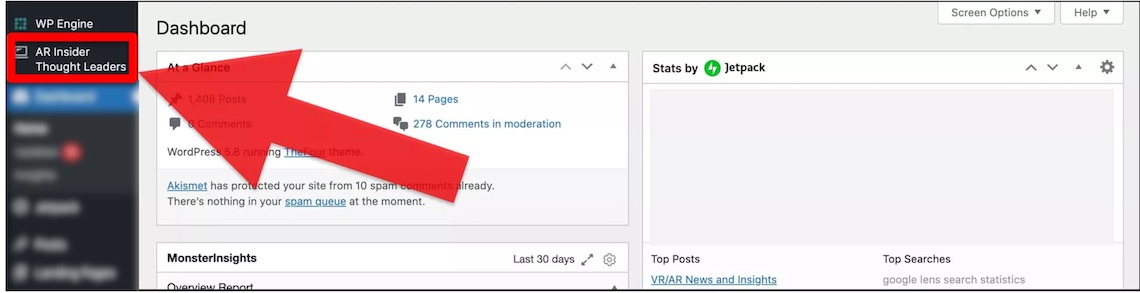
- If you ever get lost in our back end, you can always get back to the right section to draft articles using the sidebar icon shown below.
- You can contact us anytime for questions or onboarding assistance. You can also email us article copy if the above process fails in any way.
Extra Push
We’ll amplify traffic using our media playbook
Thought Leader articles get amplified automatically through our social and editorial channels. The full list of features is as follows.
- Each article gets 25 social posts over 7 days to our 25,000+ followers across Twitter, LinkedIn and Facebook. We handle everything and tag you.
- Each article is included in the weekly newsletter of whichever Engage Media publication that article shows up in (e.g., AR Insider Weekly).
- After every 3 months of membership, Thought Leaders are entitled to a standalone email marketing campaign, which consists of one email blast (details & examples here). Banner ads are also displayed on Engage Media properties for one week following the blast. Contact us to initiate the process.

Add Colleagues
Diversify the voices that publish under your account.
Each Thought Leaders membership comes with five logins, so colleagues publish under their own authorship. To add colleagues, simply follow these steps…
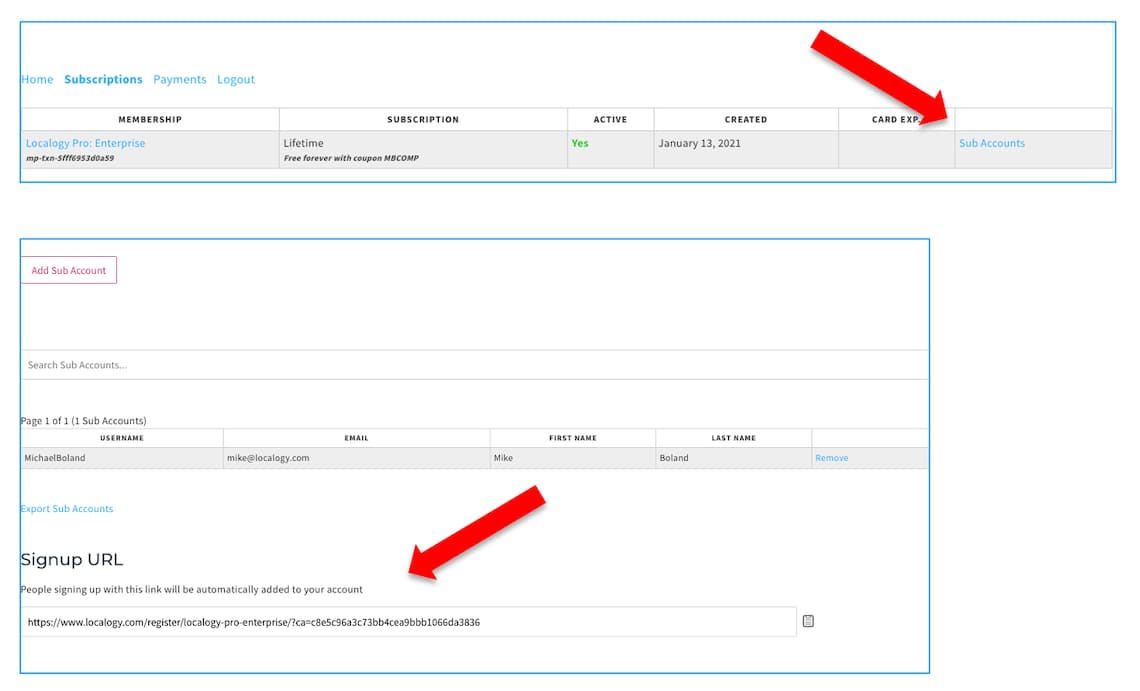
- Go to your subscription management page here.
- Click “Sub Accounts” in the right-hand column.
- Scroll to the bottom of the next page and copy the special link that’s displayed there.
- Share that link with colleagues who will be prompted to establish their own login.
- You can easily remove colleagues on the same page if you run out of seats.
Rules & Restrictions
We’re all about Quality Control
Though Engage Media’s Thought Leaders program offers members direct access to our publishing back-end for unlimited authorship, you can’t publish anything.
All material published by Thought Leaders must meet the standards in our Disclosure and Ethics Policy. We also edit copy to ensure quality, grammar, and adherence to our style manual. That being said, we don’t edit out the “voice” of the author as it’s a source of value.
Thought Leaders are also prohibited from publishing press releases or marketing materials. Articles published under the Thought Leaders program must be just that… articles. That can mean op/ed pieces, how-to guides, and narratives that amplify your unique perspectives.
We will be the judge of anything that crosses or approaches the above lines, but we will not be heavy-handed. Most content will make it through our filters as long as it’s not inappropriate, offensive, or shamelessly self-promotional. See all the do’s and don’ts in our Terms of Service.
Tips & Tactics
Ten Tips for Engaging Articles
What formats and writing styles are most successful in engaging our audience? Here are ten tips. Articles don’t have to possess all of these qualities, but cherry-picking the components that are relevant to you can elevate any given article.
1. Size matters
The most successful word counts to achieve a balance of depth and brevity is 700-1000 words, though your subject matter should ultimately determine the length of the article.
2. Talk like a human
Genuine voices are most successful in engaging readers. Speak in your own voice. A plain-spoken tone is preferable over stilted, wordy and adjective-heavy language. You’re smart, we get it… you don’t need jargon to prove it.
3. Be a thought leader
Assertive and well-backed opinions on strategy, trend analysis or product development approaches usually perform well.
4. Numerate
Consider structuring your perspectives into a list-based narrative. This includes things like “5 Ways to Boost AR Session Lengths.” These types of headlines perform well because it suggests to the reader that their time will be well spent and respected through an easily digestible and organized article. It’s also a great way to organize your thoughts and make the writing process easier to tackle.
5. Service journalism
Similar to the previous bullet, consider practicing “service journalism.” This involves “how-to” content. If you have perspective and opinions about a particular method for product development or anything else, this can be a valuable and well-performing format. Here’s an example:
6. Sell by not selling
Salesey language has a place… but not within proper editorial works. You’ll be more successful in gaining audience trust and engagement by educating them as a thought leader, which then has direct visibility benefits for you and your product. Blatantly-salesey language is a shortsighted and less effective way to achieve that goal. Readers are smart and they know when they’re being sold to.
7. Show rather than tell
One way to achieve that goal of gaining visibility for your company or product — but in an editorially-sound way — is to write about a case study. Tell us about something your company did that produced meaningful lessons. What was the goal or hypothesis? What was the process of execution? What was the outcome? And what are the lessons? When done right, this can gain reader trust and expose your company/product in meaningful and organic ways.
8. Show your work
Narratives that contain original data also perform well. In the process of telling your story or communicating your hard-fought insights, provide any original data that’s being uncovered about your product’s usage. Is it helping your users achieve any noteworthy KPIs?
9. Publishing & Images
Procedurally speaking, follow the instructions above for submitting your article drafts. If pasting copy from outside sources please “Paste and Match Style” (under the “Edit” menu of Chrome & Safari), as text otherwise brings lots of funky formatting with it. Our article header images are rather large, and need to be at least 1400px wide (example). If you don’t have images that fit that description, we can choose a thematically-relevant one from our library of pre-approved images.
10. Have fun
Though many of the above tips involve being structured and data-backed, it doesn’t mean it has to be a completely rigid endeavor. Have fun and infuse some humor, which will go a long way towards boosting your connection to the audience and some of the above variables like plain-spoken tone. Have fun with it!
Support
Ask us anything.
Resources
Manage your account & ask questions.